Copy the board they know
Import a board photo or PDF from Camera, Gallery, Files, or the iOS Share sheet. Use the exact photographed layout as a talking board or make an editable copy.
InnerVoice is an iPhone and iPad AAC app that turns the communication board they already use into a voice—and a responsive partner who waits.
Built for autistic and nonspeaking communicators of every age by speech-language pathologists, assistive technology specialists, and communication scientists.
Tap, type, or talk
Speak however they can
Finish the thought first
Speaks when they hit Send
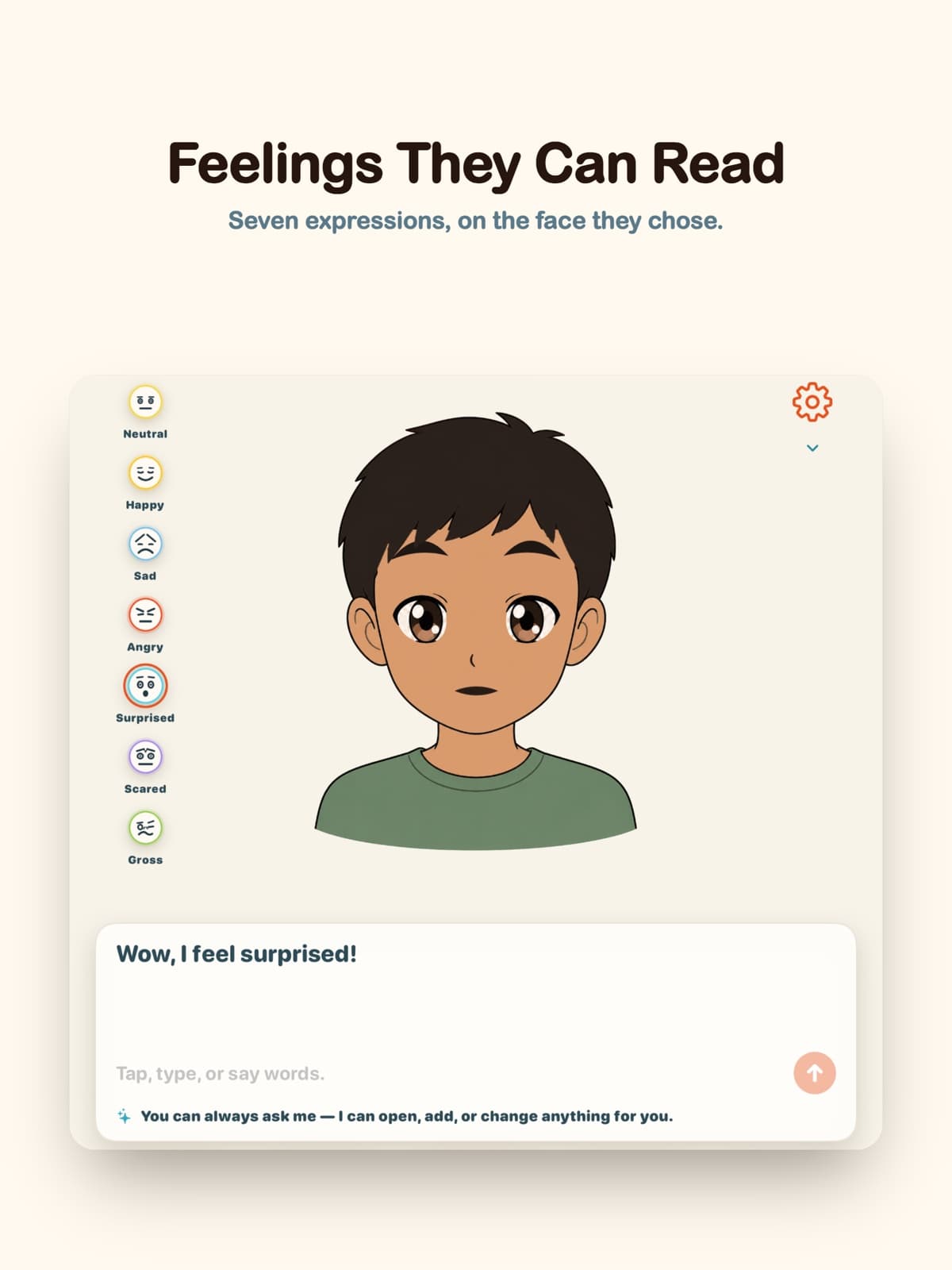
Emotion you can see
Seven animated facial expressions
Their board stays theirs
On the device, not the cloud

Natural-sounding voices
Working boards are stored on the device
Built by speech-language pathologists
One app. The whole moment.
InnerVoice preserves familiar access while opening more ways to say, change, refuse, ask, comment, and connect.
Import a board photo or PDF from Camera, Gallery, Files, or the iOS Share sheet. Use the exact photographed layout as a talking board or make an editable copy.
The avatar asks a real question, waits without guessing, and responds inside the vocabulary available on their board.
Scene Talk finds words in a real photo. When the communicator asks for a picture, InnerVoice helps shape one simple, safety-checked image around their interest.
Say or type what to add, remove, or rename. InnerVoice makes the change immediately, and Undo keeps the last edit reversible.
Taps accumulate into a message. Keep composing, edit when needed, and press Send only when the thought is ready.
Refuse, redirect, comment, ask, and request a break. Communication is bigger than “I want.”
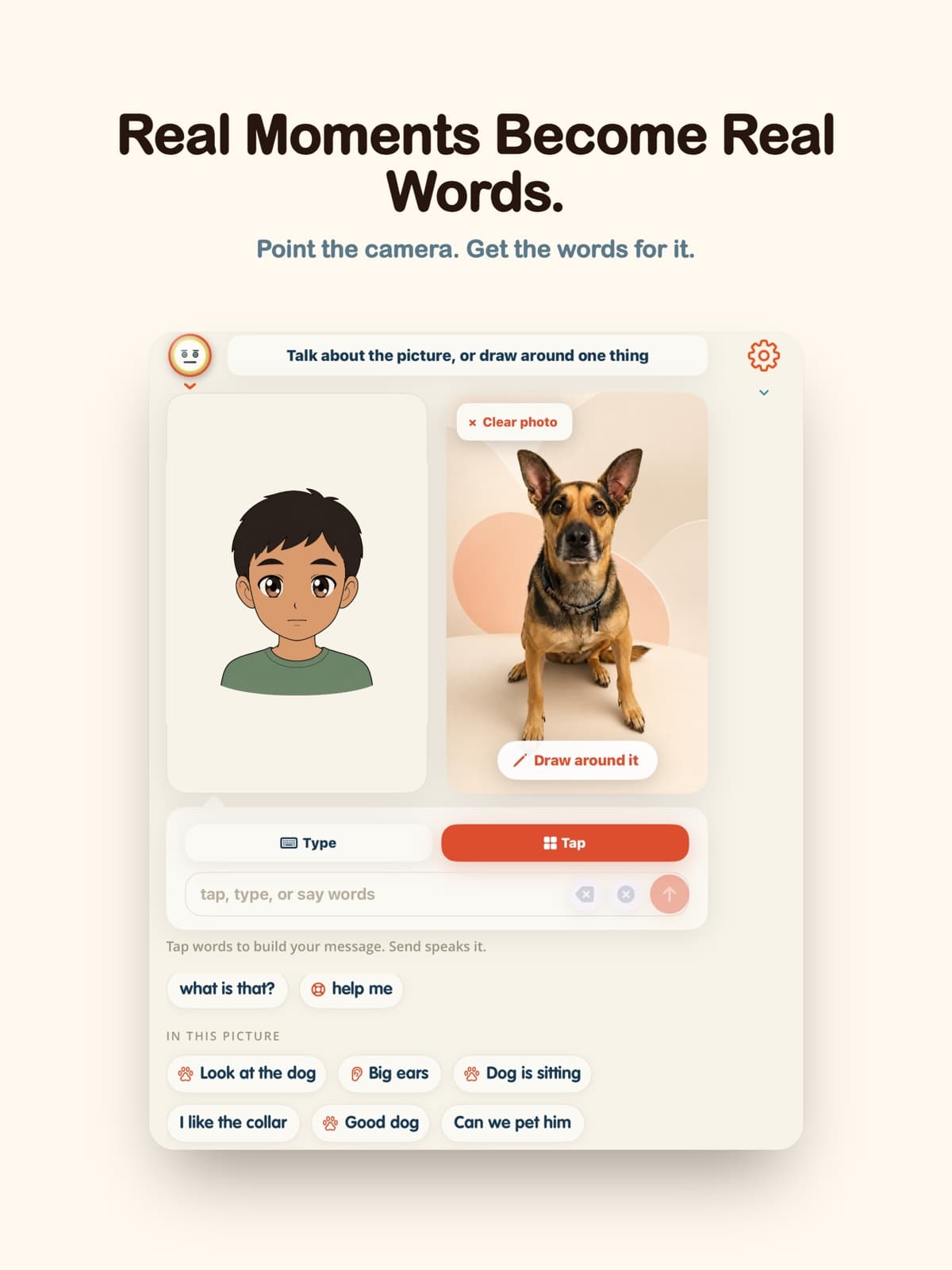
Scene Talk
Point the camera at what is happening now. InnerVoice offers language connected to the actual scene, helping communication move beyond the therapy room and into everyday life.
Conversation, not compliance
InnerVoice asks a real question and waits. It models grammar without correcting out loud, expands a message by one useful step, and treats refusal, redirection, and asking for a break as communication.
When the communicator asks for a picture, InnerVoice helps choose one simple detail and creates a safety-checked, non-human image connected to that interest. Photos and drawings can also become communication turns—not a quiz or a token reward.
“No.” “Not that.” “I need a break.” Those are full, important messages.
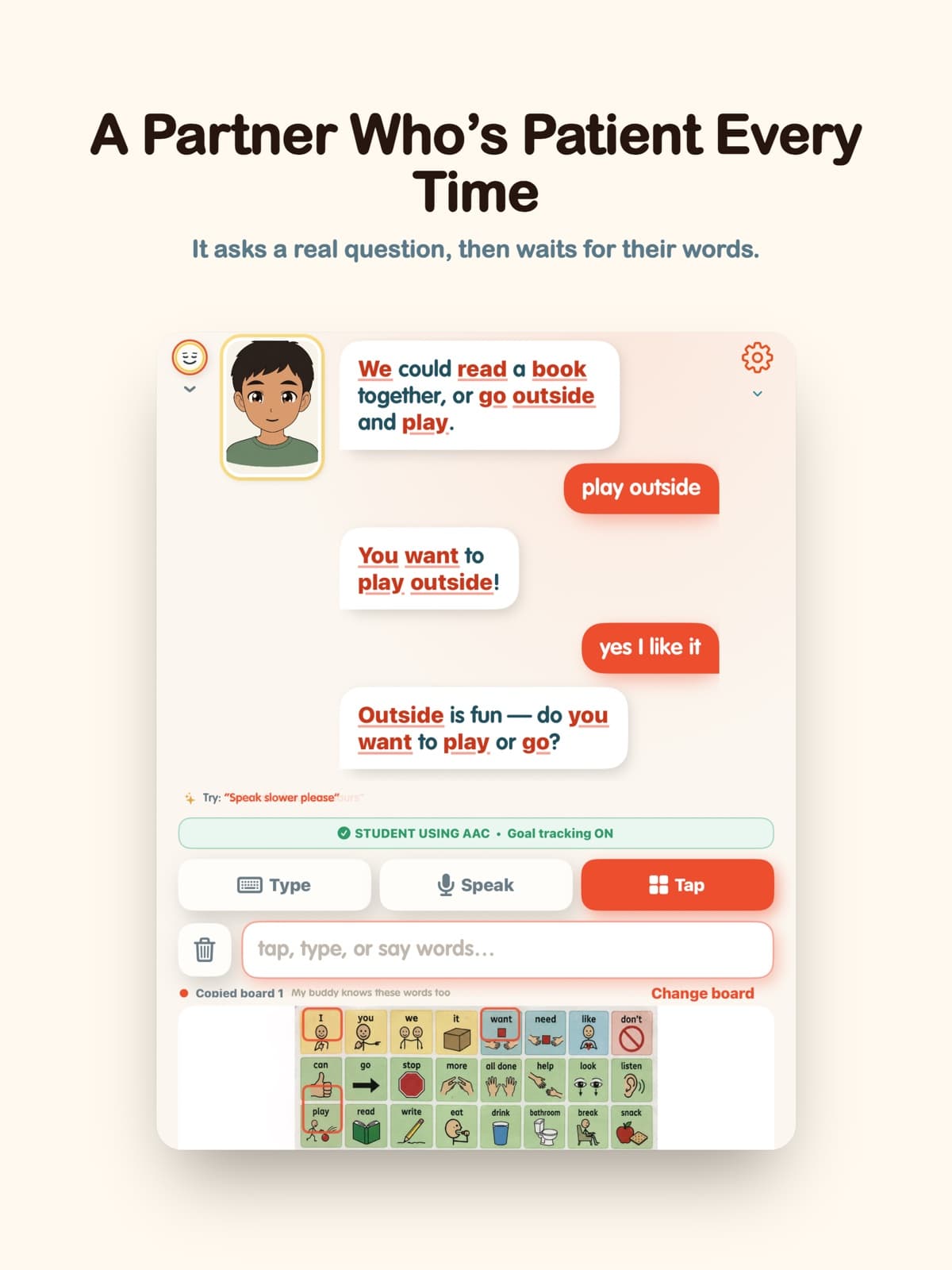
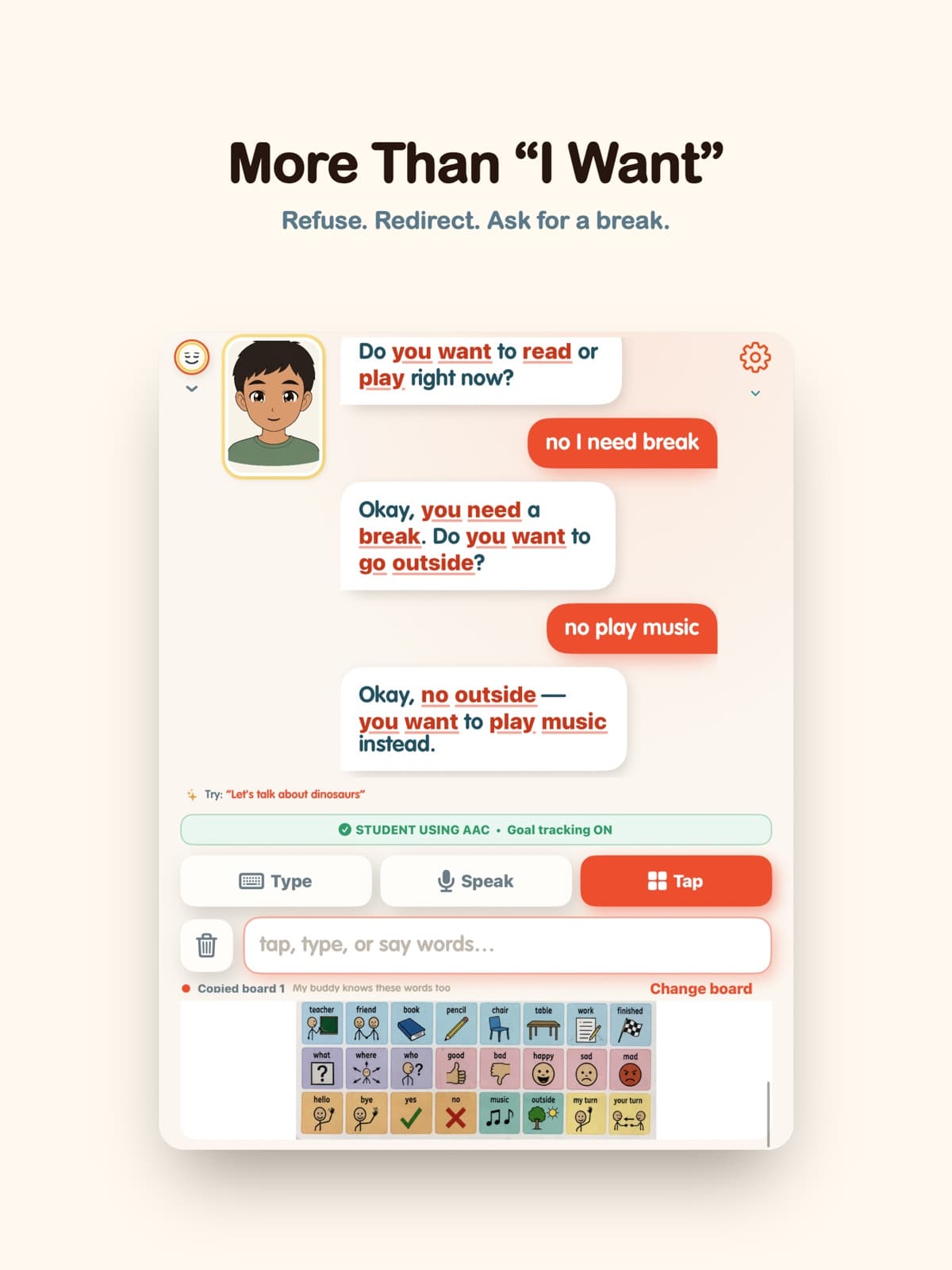
A face they design
InnerVoice 7 uses the V4 avatar system exclusively. Designed by Matthew Guggemos, V4 combines seven carefully drawn expressions with anime-inspired speech animation to make the relationship among facial expression, spoken language, written language, and button-to-speech AAC easier to see. Choose skin tone, hair, eyes, and shirt color; V4 blinks and animates each spoken word. It does not use gaze tracking.
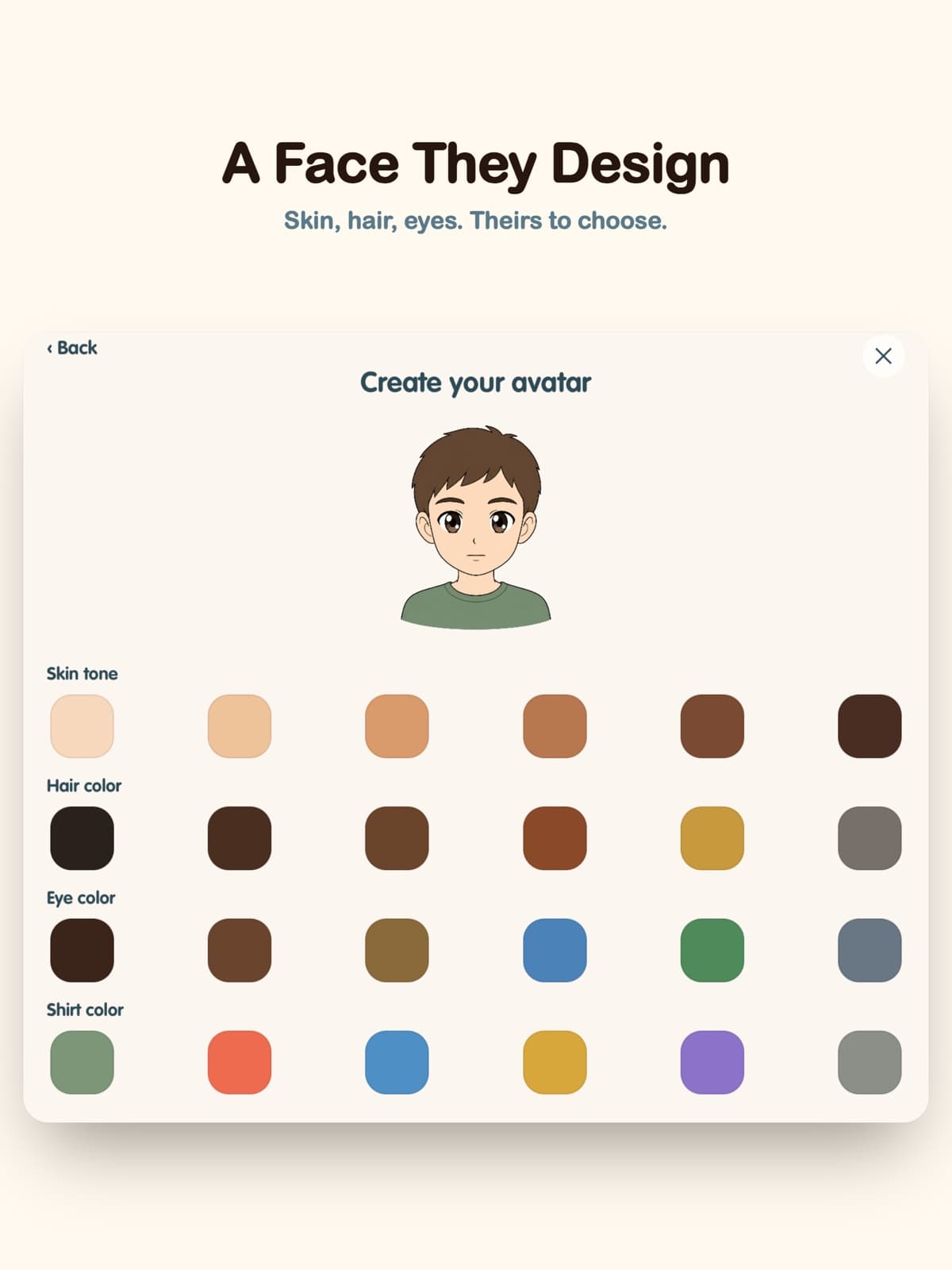
Support for the partner, too
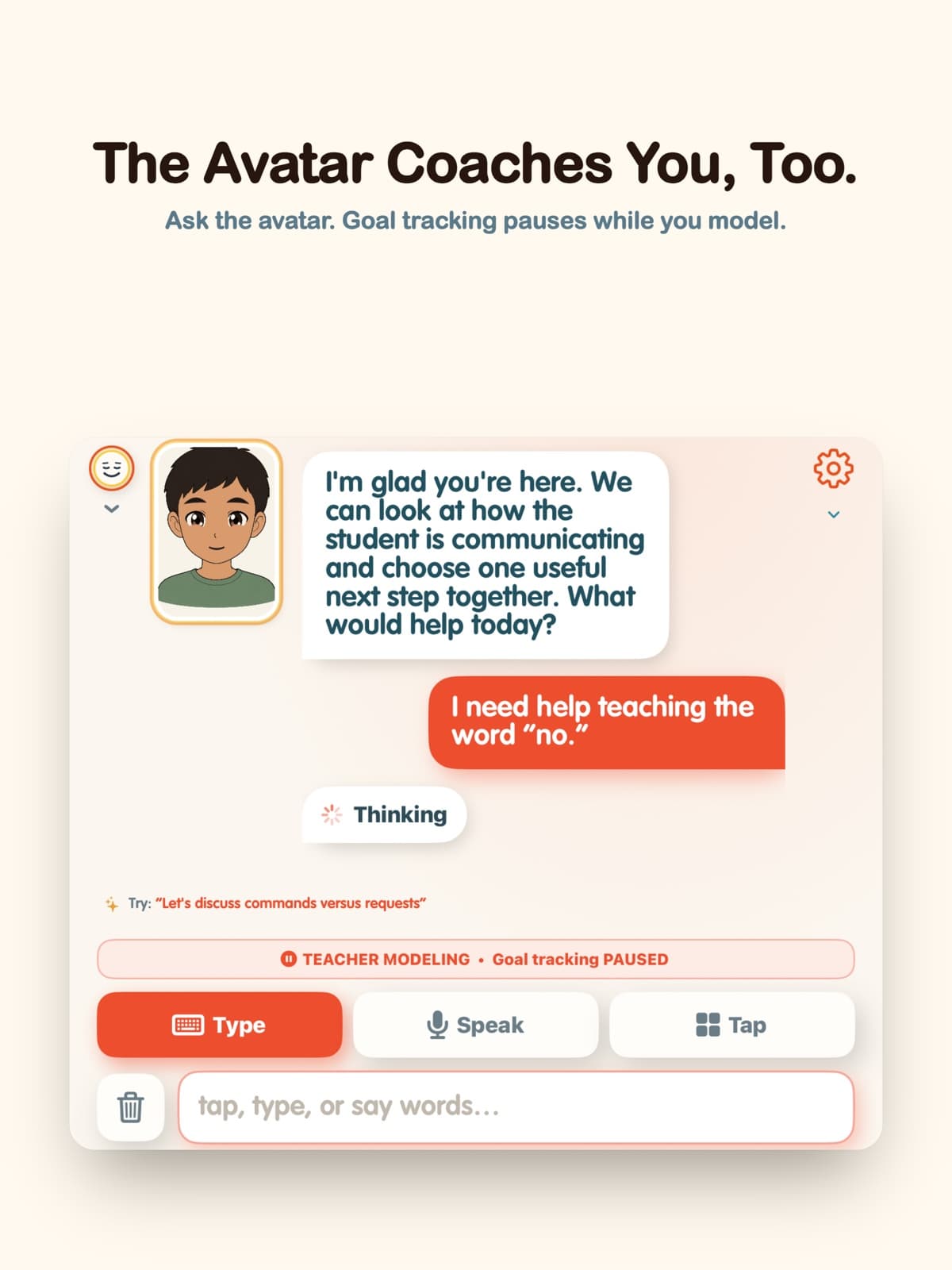
Ask the avatar for evidence-aligned AAC partner guidance, then track a goal without turning the interaction into a clipboard exercise. InnerVoice records defensible opportunities inside the vocabulary on the student's board and holds uncertain items for review; clinicians and educators remain in charge of the goal, supports, and meaning.
A visible mode pauses goal tracking so adult models never count as the student's own communication.
Type, dictate, paste, or photograph a goal. For interactions with enough context, InnerVoice records the opportunity, outcome, source, and rationale; uncertain items stay out of the score for review.
Review or compare locally archived samples, then use Export for EASI to create a timestamped plain-text transcript. Print or share it through the iOS Share sheet; nothing uploads automatically.
InnerVoice → EASI
InnerVoice keeps recorded turns in a local archive and can compare two samples over time. Use the explicit Export for EASI action to create a plain-text transcript, then bring it into EASI's existing- transcript workflow for clinician review, attestation, analysis, and reporting. There is no automatic upload or live sync.
See the complete InnerVoice + EASI workflow01
Use the familiar board, icon book, typing, speech, photos, or drawings.
02
Follow interests while the partner models, waits, responds, and expands.
03
See source-supported goal trials, rationales, speaker, and input mode; keep uncertain items out of the score.
04
Manually export the plain-text sample and bring it into EASI's clinician-controlled existing-transcript workflow.
Board edits schedule an iCloud backup when iCloud is available. Manual Backup reports how many items copied, and Restore remains a deliberate action in Settings.
InnerVoice supports communication. It does not replace the communicator and is not a medical device.
Their familiar board, their chosen face, their words, and their decision about when to press Send.
InnerVoice questions
InnerVoice is an AAC app for autistic and nonspeaking communicators of every age. It turns an existing paper or printed communication board into a talking board and adds tools for conversation, communication-partner support, and clinical documentation.
Yes. Import a photo or PDF with Camera, Gallery, Files, or the iOS Share sheet. InnerVoice preserves the board's visual layout and button positions so it can speak as photographed, or you can make a separate editable copy.
InnerVoice Board Mirror imports a photo or PDF of a paper board, laminated core board, or icon-book page and turns the exact photographed layout into a tappable text-to-speech board. A separate editable copy is also available.
Yes. Tapped words accumulate into a message. The communicator can keep composing, use Backspace or Clear when needed, and choose Send when the full thought is ready to speak.
Scene Talk uses a photo of the real moment—a snack, dog, playground, classroom, or anything else—to offer words and phrases connected to what is actually there.
The avatar can explain practical AAC partner strategies in plain language. Teacher Modeling visibly pauses goal tracking so an adult's modeled language is not counted as the student's own communication.
For interactions with enough context, InnerVoice records a goal opportunity, outcome, source, and rationale during natural communication. Uncertain responses stay out of the score for review, and Teacher Modeling never counts as the communicator's own language.
InnerVoice keeps recorded conversation turns in its local Transcript Center. An explicit Export for EASI action creates a plain-text sample with time, speaker, and input mode and opens the iOS Share sheet. Nothing uploads or syncs automatically; the clinician brings the transcript into EASI, reviews and attests it there, and remains responsible for interpretation.
No. Export for EASI creates a plain-text transcript and opens the iOS Share sheet. A clinician manually brings that existing transcript into EASI, where review and attestation happen before scoring or reporting.
InnerVoice 7 uses Matthew Guggemos's V4 avatar system exclusively. V4 combines seven carefully drawn expressions with anime-inspired speech animation and does not use gaze tracking, photo avatars, or drawn self-portraits.
No. InnerVoice supports communication; it does not replace the communicator. It is a communication-support tool, not a medical device.
Free to download
Try InnerVoice on iPhone or iPad. A subscription unlocks the full app, including Board Mirror, Scene Talk, goal tracking, and language sample export.
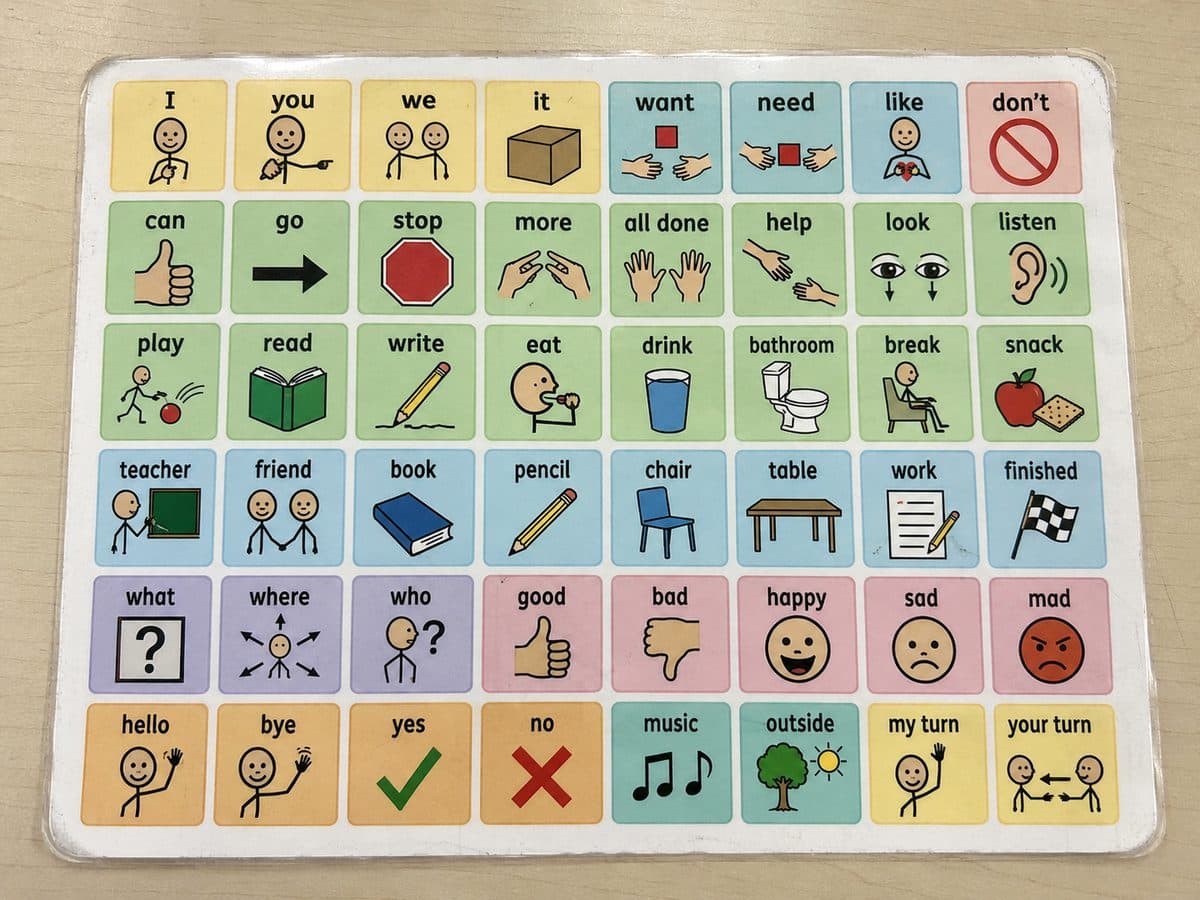
Their paper board — photo it, and InnerVoice makes it talk.